Correction, Oct 21, 2026: Two example figures were too low. Backup charges round up to the next 50 cents, so the example month is $31.50 before tax, not $31.33. And a resize on or before the 28th puts the whole month on hourly billing, so the launch-weekend resize adds about $4.79 to a 30-day month and $5.79 to a 31-day month, not $2.79.
If you run a small WordPress site, start on 2GB. That's the size I start clients on, and for a small site I'd pick the 2GB Premium server on DigitalOcean: $28 a month, billed by the hour, and that's the regular price, not a first-year teaser. If $4 a month matters to you, the 2GB Standard server at $24 is a perfectly good start. Skip the 1GB plan for anything real, and don't let the sign-up screen talk you into 4GB on day one. And if this is your very first website and you want the domain, email and site in one account, I'd point you to Bluehost instead; more on that below.
I've built and run client WordPress sites for about twenty years, and Cloudways has been one of the places I put them for a long time now. I still get the monthly bills on some of those accounts, and the biggest is more than $2,000 a month. If you're reading this, your site probably belongs at the cheap end of Cloudways' price list, and that's the end this review is written for.
Before writing this, I spun up a fresh trial server on Oct 12, 2026 (DigitalOcean, the 2GB Premium size, San Francisco, WordPress) and clicked through every screen you'll see below. Prices and screenshots are from that day. This covers Cloudways' "Flexible" product, where you pick your own server.
One thing before any links. I earn a commission if you sign up through my links. Cloudways pays me a one-time fee when you sign up, plus a share of what you pay for as long as you stay a customer, which is exactly why I tell people to buy the smallest plan that works. Someone on the right plan who stays for years is worth more to me than someone I oversold who leaves after three months. If Cloudways fits you, you can start the free trial here. No card needed.
Who Cloudways is for, and who should go elsewhere
Cloudways rents you a small cloud server from a provider like DigitalOcean and puts a management dashboard on top, so you get a server sized for your site without having to run it yourself.
It's a good fit if:
- You run a small business site, a blog, or a small store and want to pay as you go for a server sized to your site.
- You don't mind a dashboard full of settings and a short setup list on day one.
- You want staging (a private copy of your site for trying changes), daily backups and room to grow without changing hosts later.
- You have two or three small sites. Cloudways doesn't cap the number of sites on a server; the server's memory does.
It's not the right fit if:
- This is your very first website and you want the domain, the email and the site in one account. On Cloudways, mailboxes are an add-on and the domain is a separate piece you connect yourself. For that person I'd suggest Bluehost, where you can buy the domain, the hosting and email (also an add-on) in one account. I earn a commission there too. Wherever you go, check the renewal price, not just the first-term price.
- You never want to see a setting. Cloudways is friendly for what it is, but it still asks you to pick a server size and a region, and it starts new sites on an older version of PHP (the language WordPress runs on) that you should change yourself.
What Cloudways costs
Prices checked Oct 12, 2026 on Cloudways' own pricing page and dashboard. These are DigitalOcean "Basic" servers, meaning the processor is shared with other customers' servers. Cloudways' own scaling screen describes Basic as right for "low traffic sites like blogs, test environments, or small businesses," which is who this review is for. Premium uses NVMe drives, a newer kind of SSD (solid-state drive); Standard uses regular SSDs.
| Size | What you get | Standard (SSD) | Premium (NVMe) | Renews at |
|---|---|---|---|---|
| 1GB | 1 core, 25GB disk, 1TB transfer | $11/mo | $14/mo | Same price |
| 2GB | 1 core, 50GB disk, 2TB transfer | $24/mo | $28/mo | Same price |
| 2GB-2c | 2 cores, 60GB disk, 3TB transfer | $33/mo | $37/mo | Same price |
| 4GB | 2 cores, 80GB disk, 4TB transfer | $46/mo | $54/mo | Same price |
Cloudways Flexible on DigitalOcean, Basic servers. Prices checked Oct 12, 2026 on Cloudways' pricing page and launch screen. Prices exclude tax. Transfer is how much data your visitors can download from the server each month.
Three things about that table.
These are regular prices, not intro prices. Cloudways bills by the hour: 2GB Premium is listed at $28 a month or $0.0417 an hour, so a server that runs only part of the month costs less. Cloudways caps a full month at the listed $28, even a 31-day one, unless you resize that month (more on that below). No first-year discount is built in, so the price you start at is the price you renew at (as of Oct 12, 2026). Over three years, 2GB Premium comes to $1,008 before tax and extras ($28 × 36), and Standard to $864 ($24 × 36), as long as prices hold. That's the main reason I like it for small sites: there's no renewal jump to plan around. If you're weighing it against shared hosting, I put six hosts' renewal prices side by side in what WordPress hosting costs after year one.
Cloudways does run short promos now and then. A 40%-off one ran in September and had ended when I checked on Oct 12, and by Oct 21, 2026 its promo page was advertising 40% off the first four months for new customers again, with no end date shown. A discount on your first few months is still an intro price, so if you join during one, expect the bill to rise to the table price when it ends.
Premium is the default; Standard hides behind a toggle. The pricing page and the launch screen both open on Premium. The "starting at $11/month" in Cloudways' FAQ is Standard 1GB, which you only see if you flip the switch.
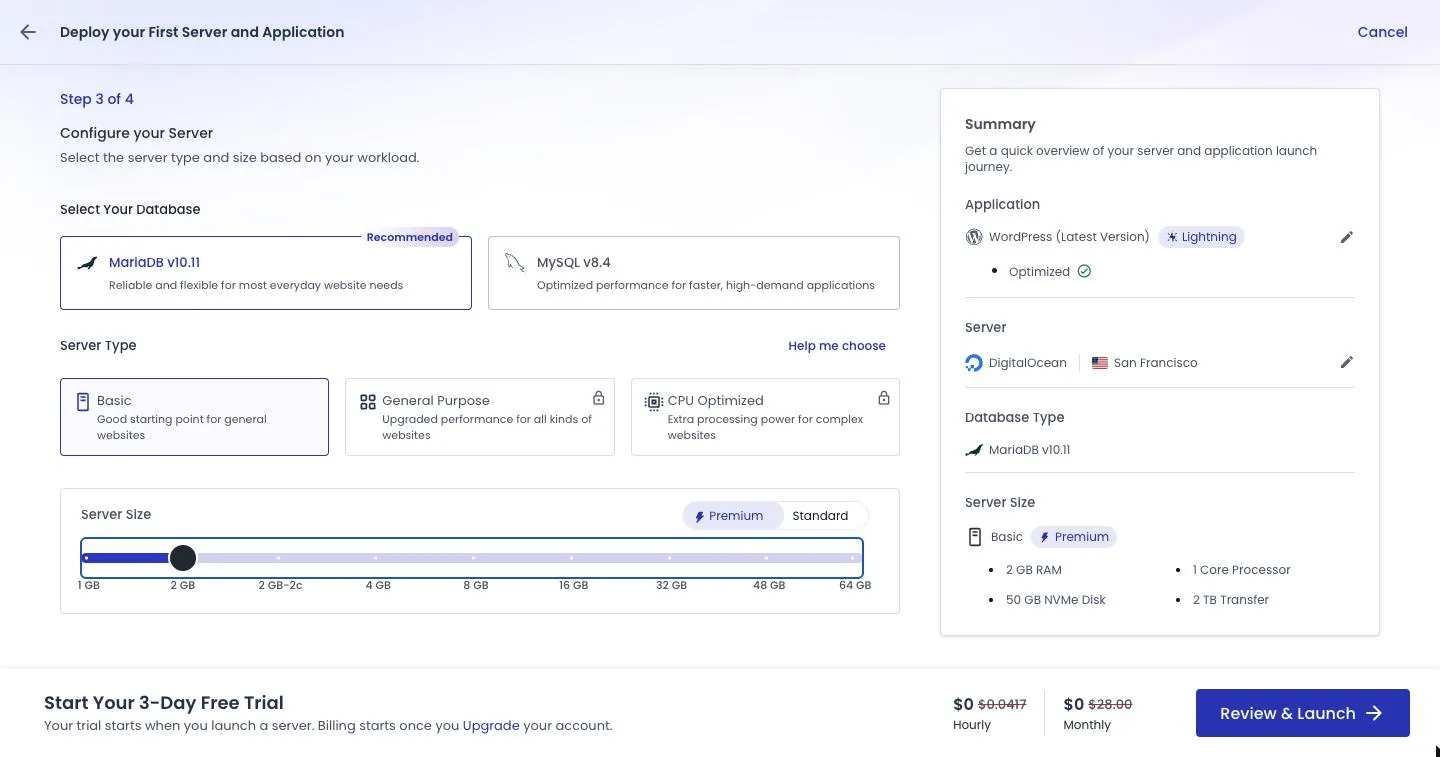
The launch screen starts at 4GB. When I opened the server setup, the size slider sat on 4GB Premium at $54 a month. Slide it down; going up later is easy.
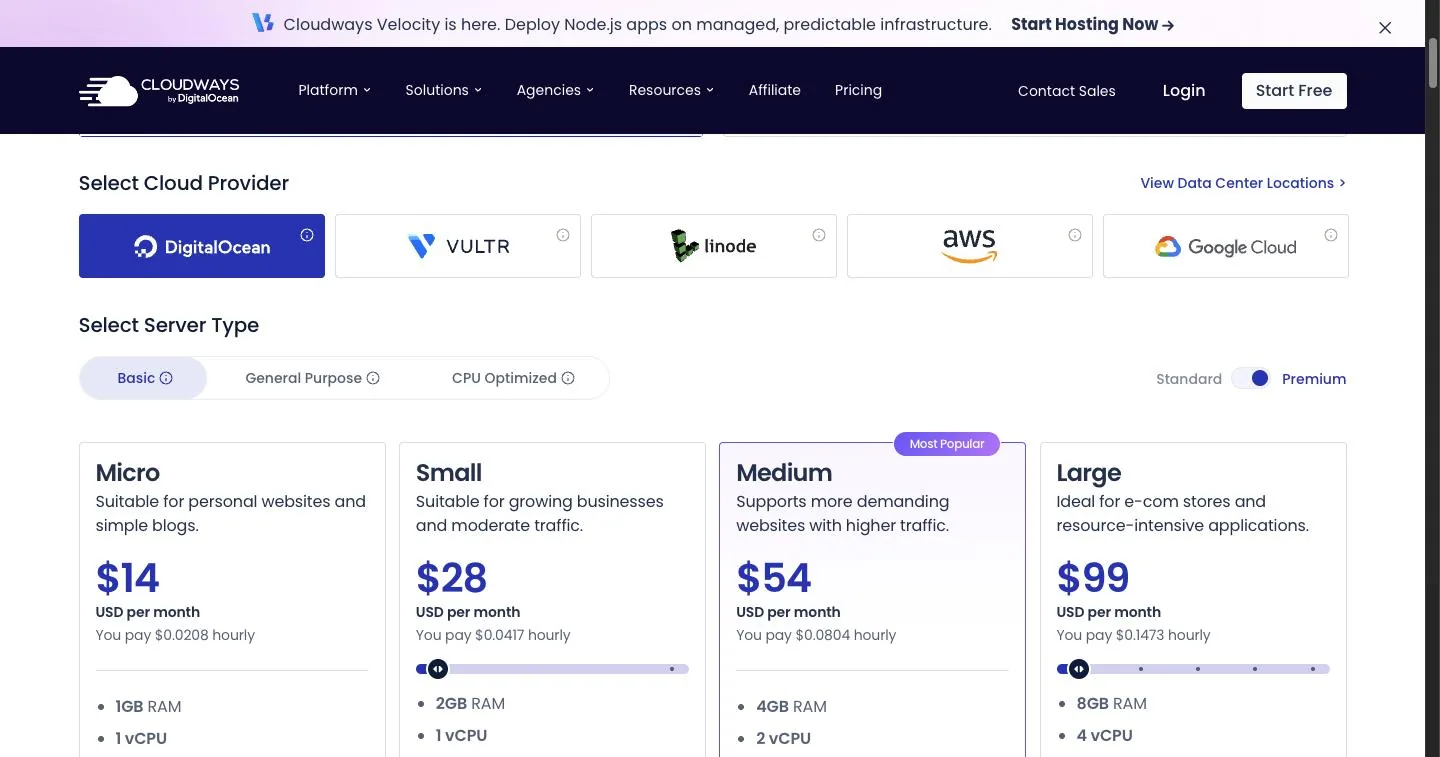 The pricing page opens on Premium, with a "Most Popular" badge on the $54 plan. A small site doesn't need it.
The plan I start clients on
1GB ($14 Premium, $11 Standard): staging or very quiet sites only
Cloudways says so itself. Pick 1GB on the launch screen and a warning appears: "Recommended: 2GB (or higher) for production website(s). 1GB is for WordPress staging or low traffic website(s)."
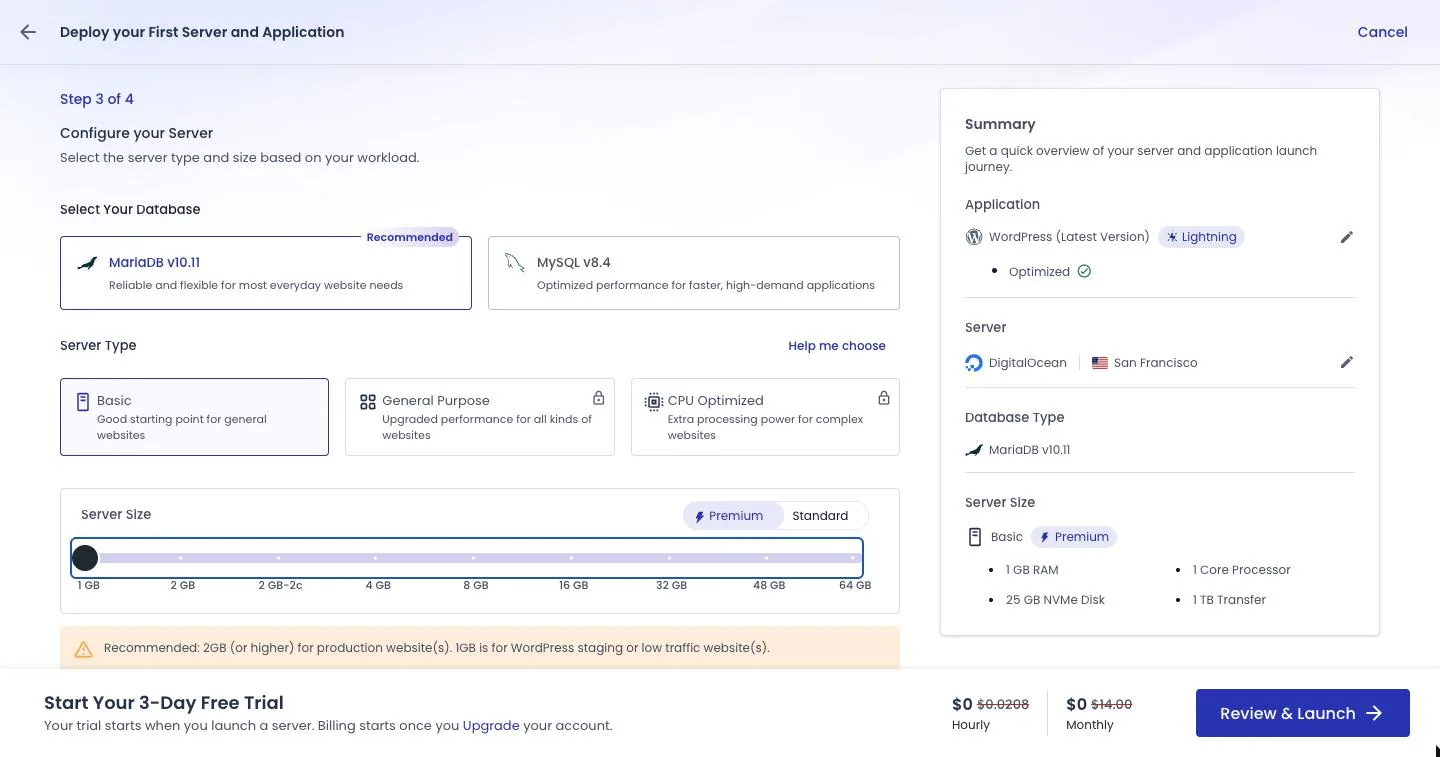 Step 3 of the launch screen on 1GB. Note the warning under the slider.
Here's why I agree. About twenty minutes after my 2GB trial server came up, with nothing on it but two empty WordPress installs (a site and the staging copy I'd just built), it was already using 989 MB of its 1.92 GB of memory. That's mostly the server software: web server, database, caching and security tools. Your plugins, visitors and content all come out of what's left. On a 1GB server, there's a lot less left.
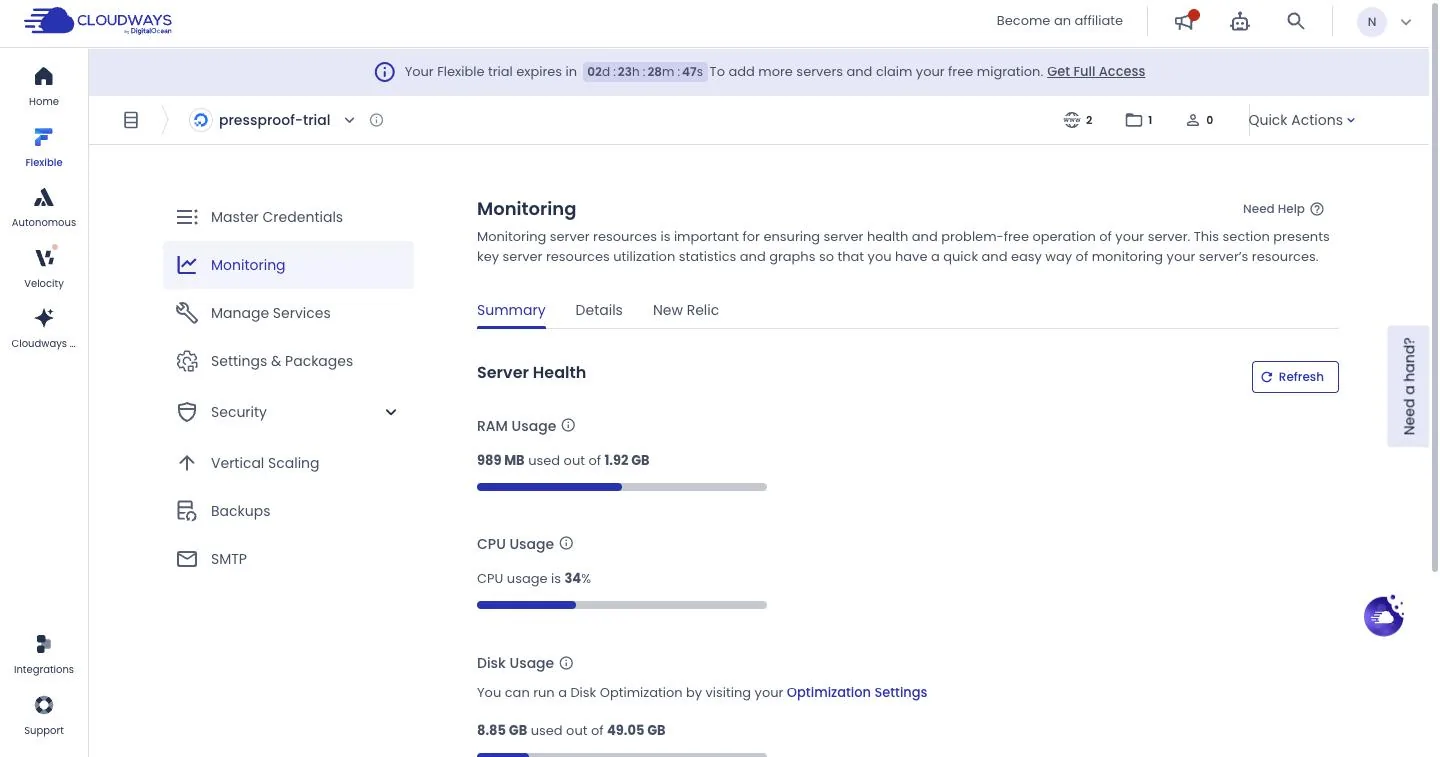 My trial server about 20 minutes after setup, with two empty WordPress installs on it.
2GB ($28 Premium, $24 Standard): where I start clients
2GB is where I start a client's business site, a blog with steady readers, or a small shop. Remember the memory reading above: the server software plus an empty site and its staging copy used about half of the 2GB. That leaves a bit under a gigabyte for your theme, plugins and visitors, which is comfortable for a small site.
The exception is a site that does heavier work from day one, like a store with lots of orders or a membership site, or one that expects a lot of visitors right at launch. Those start bigger.
Premium or Standard? Same memory, same disk size. Premium has the newer NVMe drive and costs $4 more. For $4 a month I'd take it, but I can't show you a speed difference from one trial server. If $4 a month matters to you, start on Standard at $24; I'd have no problem starting there. Either way, you can scale up later.
4GB ($46 Standard, $54 Premium): a busy store
If you run a WooCommerce store with orders coming in every day, 4GB is where I'd look, and not before.
Cloudways can't agree with itself
The launch screen says 2GB is for production sites. The Vertical Scaling page on the same server says "Recommended: 4 GB (or higher) for production website(s). 2 or 1 GB is for staging website(s)." And the PHP version dialog suggests scaling "to at least 4 GB" (that one is really about running several PHP versions on one server; more below).
My plain answer: a small site does fine on 2GB, and if it ever outgrows it, scaling up is a slider and a button. Don't pay for 4GB to settle an argument Cloudways is having with itself.
Resize up for launch weekend, back down after
This is my favorite thing about Cloudways for small sites. Under Vertical Scaling, you can slide the server to a bigger size for a busy stretch (a launch, a sale, a mention in the local paper) and slide it back afterward. Cloudways' own page says: "You can revert this setting anytime."
The catch is one toggle: Include Disk Space in Scaling. It's off by default. Leave it off. Turn it on and the disk grows with the server, and Cloudways warns that "once increased, the server cannot be scaled down directly; scaling down is only possible through the cloning feature." Cloning means building a copy of your server and moving onto it, which is not a launch-weekend job.
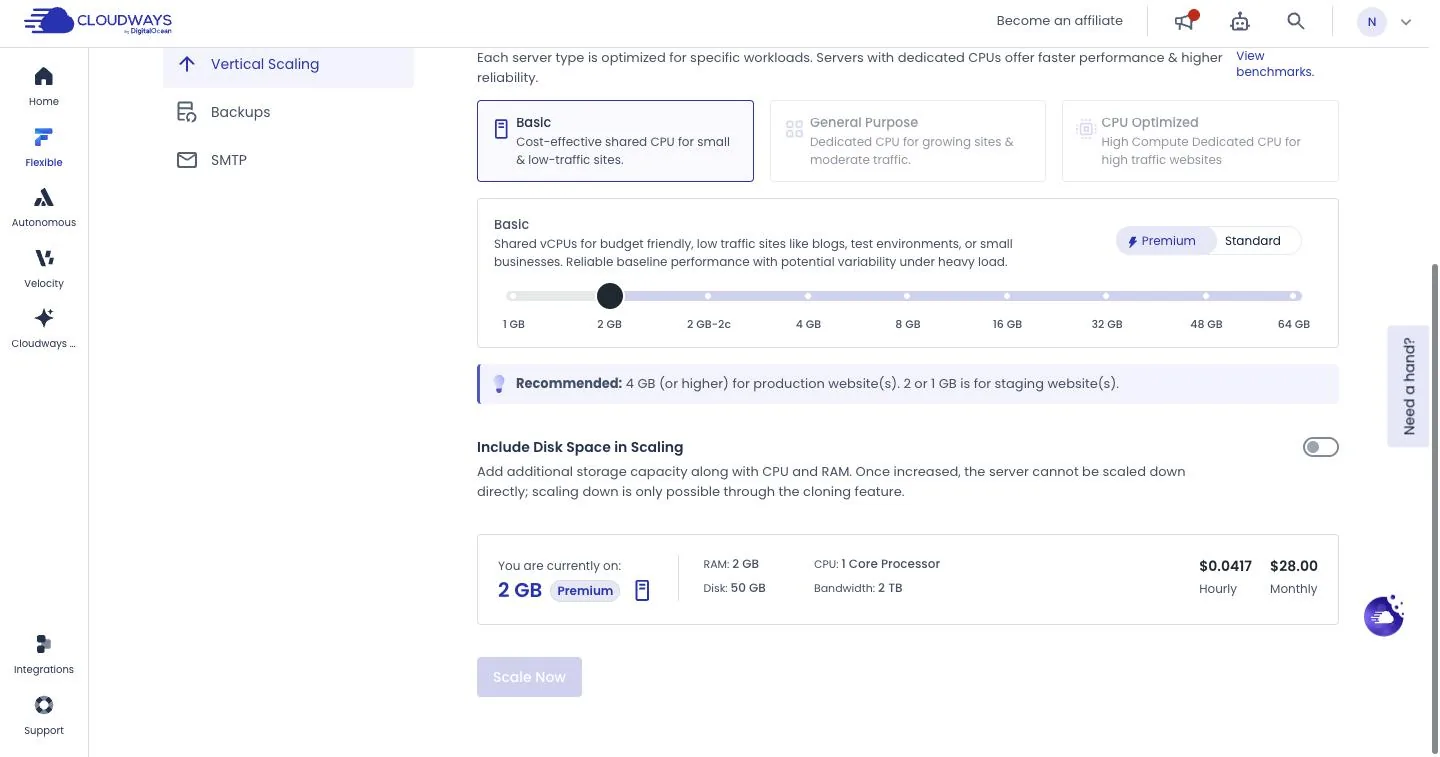 Leave "Include Disk Space in Scaling" off and a resize can be undone.
A short bump is cheap, but it costs a little more than the hourly rates suggest. Left alone, 2GB Premium is capped at $28 a month, and its $0.0417 hourly rate is that $28 spread over the 672 hours in a 28-day month. Cloudways' help pages say the cap only applies when one size runs the whole month. Resize on or before the 28th, and the whole month is billed by the hour, each size for the time it ran, so in a longer month you also pay for the days after the 28th. A three-day weekend (72 hours) on 4GB Premium ($0.0804 an hour) adds about $4.79 to a 30-day month and $5.79 to a 31-day month. That's arithmetic, not an invoice. A resize after the 28th is billed differently, and one that keeps your original disk may not be priced exactly like the table, so if the exact figure matters, ask Cloudways' support chat first.
One quirk: on my 2GB server the slider wouldn't go down to 1GB, most likely because 1GB's disk (25GB) is smaller than the 50GB the server already has. I wouldn't run a real site on 1GB anyway.
When a resize goes wrong
Most of my resizes have been uneventful. One went badly, and it was the scaling-down step. A while back I scaled a client's server down one evening (that server wasn't on DigitalOcean). The next day the resize was still stuck and the site was down.
I opened a live chat. A bot answered first with generic steps, then a person from Cloudways' technical support team joined the same chat and found what had actually taken the site down: the server's disk had filled up, mostly with files from Redis (one of the caching tools on the server) plus about 3GB of logs, and with no space left the database had stopped. They cleared space and the site started responding again while we were still chatting. But pages were coming up without their content, and the resize itself looked stuck at the cloud provider's end, so they escalated it to a ticket. Early the next morning the ticket came back: Redis had broken when the disk filled up, they'd fixed it, and the site was working again.
What I took from it, and what I'd tell you:
- Take an on-demand backup before any resize.
- Check disk space on the Monitoring screen first. A full disk is what actually took my client's site down.
- Resize a few days before a launch or a sale, at a quiet hour when you can stick around and check the site afterward. Never the morning of.
- If your site is down, use live chat and say so plainly. That chat got a person on it and the site responding again in the same session; the rest was fixed by ticket the next morning.
What a real month costs: a worked example
The server isn't the whole bill. Here's an example for a small site on 2GB Premium at Cloudways' prices on Oct 12, 2026. It's arithmetic, not a real invoice.
| Line | Example | Cost |
|---|---|---|
| 2GB Premium server | listed monthly price | $28.00 |
| Off-site backup storage | 10 GB × $0.033, rounded up to the next 50 cents | $0.50 |
| Email (optional) | 2 mailboxes × $1.50 | $3.00 |
| Before tax | $31.50 | |
| Sales tax or VAT | depends on your billing address | added separately |
Example calculation, not a measurement. Prices checked Oct 12, 2026.
Backup storage is $0.033 per GB per server, and Cloudways rounds the charge up to the next 50 cents. The 10 GB is just an example, and yours depends on your site's size and how long you keep backups. Each server also includes a transfer allowance (2TB on the 2GB size), which is a lot for a small site. Past that, extra DigitalOcean bandwidth is $0.02 per GB.
None of the add-ons are needed to launch a small site. The one you're most likely to want is email mailboxes ($1.50 each, covered below). The rest can wait: Cloudflare's premium CDN add-on (a CDN serves copies of your site from servers around the world; from $4.99 per domain a month), Site Manager (from $3 per app), Malware Protection (from $4 per app), DNS Made Easy ($0.50 per domain) and Advanced Support ($100 a month or 10% of your invoice; on Oct 12, 2026 a limited-time offer showed a flat $25 a month for life).
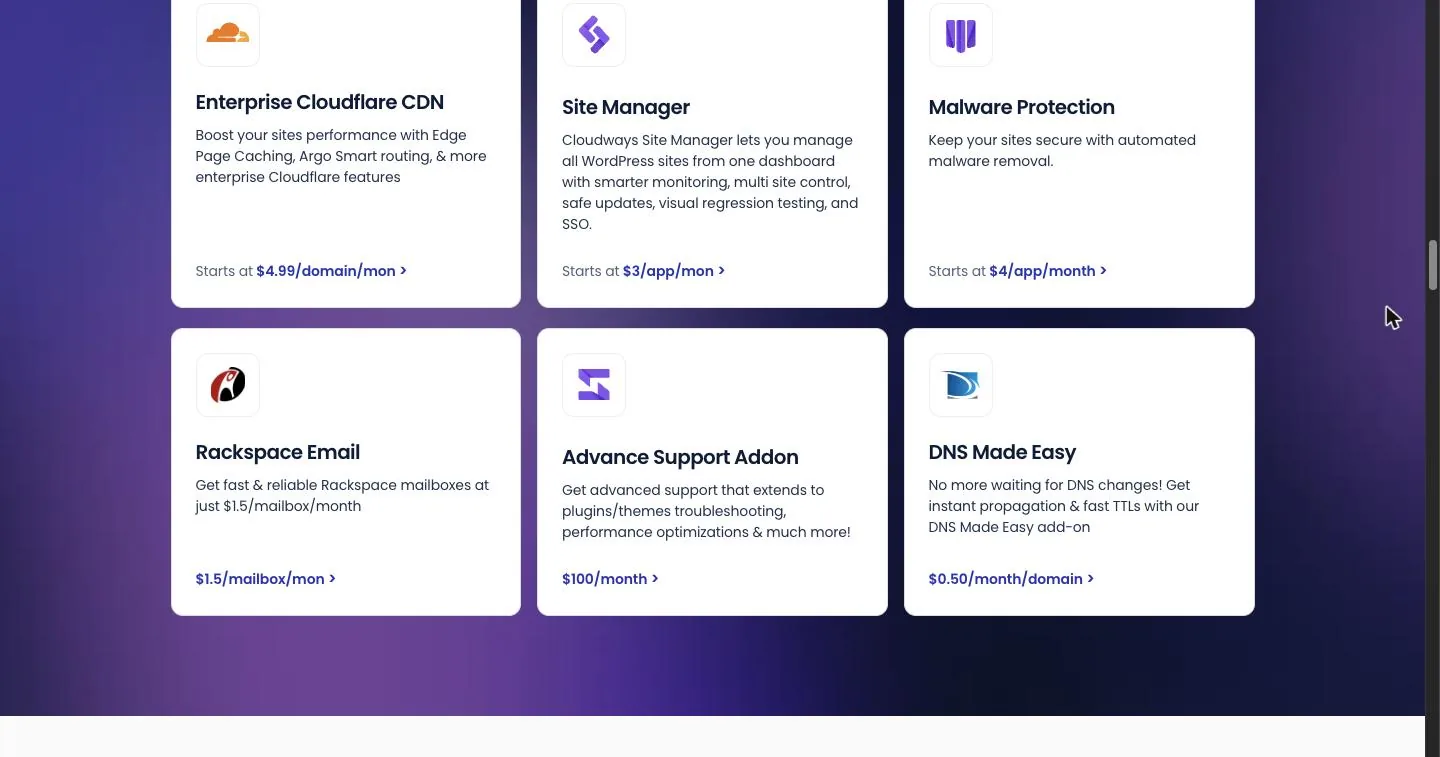 Add-ons on the pricing page, Oct 12, 2026. None are needed to get started.
What you get for the money
Here's what came with my trial server, plus what the pricing page says every plan includes:
- Your choice of stack (the bundle of server software your site runs on). Lightning, built on Nginx (the web server software), or Hybrid, which adds support for .htaccess files, the Apache-style settings files some plugins expect. You can switch later under Application Settings, then WebStack.
- Caching and server software, already running. Redis, Varnish and Memcached (caching tools that keep ready-made copies of pages and database lookups so the server does less work per visit), PHP-FPM (the part that runs WordPress's code), the MariaDB 10.11 database and the Imunify360 security firewall.
- Backups. Daily by default, kept for one week, plus on-demand backups whenever you want one, like right before a big plugin update.
- Free SSL. A Let's Encrypt certificate (the browser padlock), installed from the app's SSL screen.
- Staging, covered below.
- 24/7 support. Live chat and tickets around the clock on every plan.
One fine-print note: the pricing page's free Object Cache Pro (a caching plugin Cloudways says usually costs $95 a month) is free only "on 4GB server or above." On the 2GB server I recommend, you don't get it free.
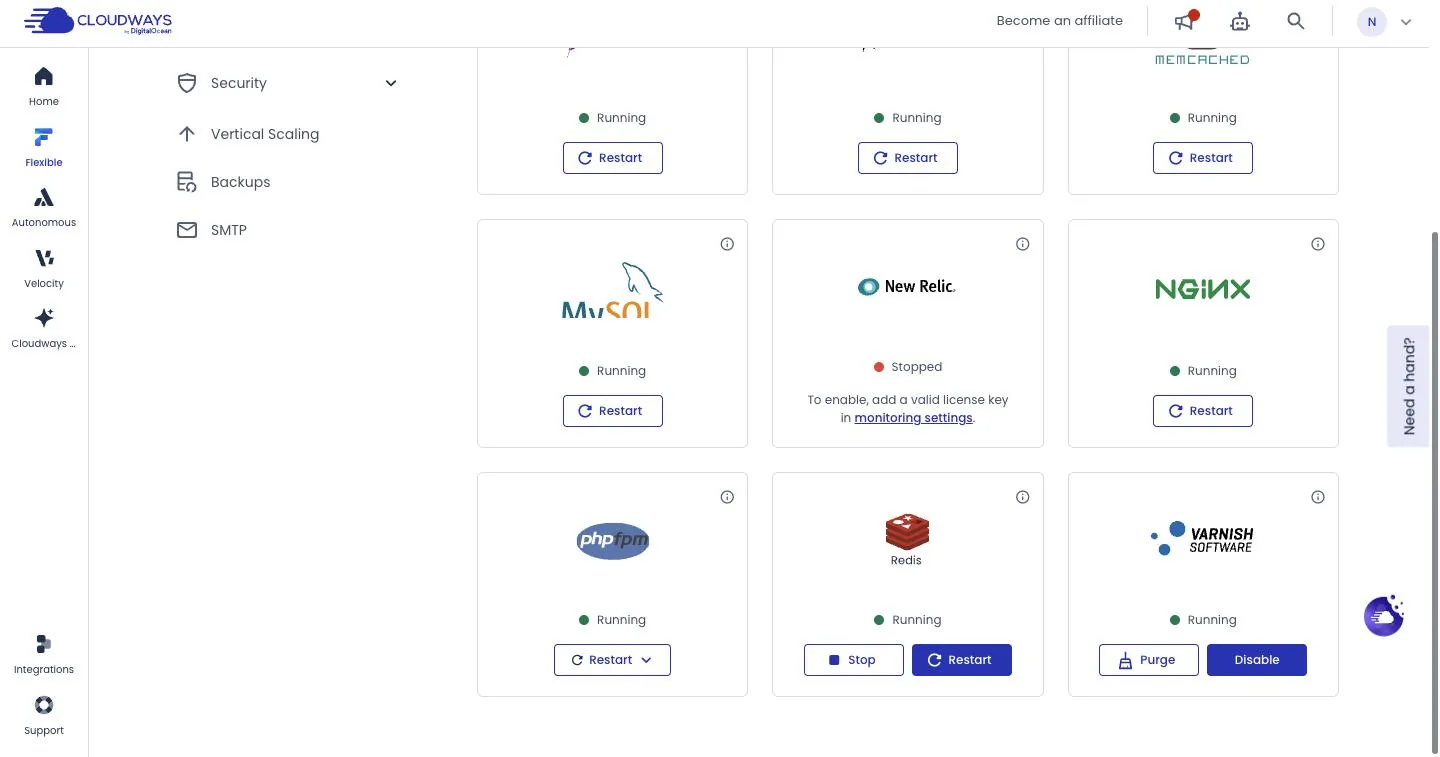 Everything's already running on a fresh server. New Relic needs your own license key, and the SMTP item on the left is where you fix site email.
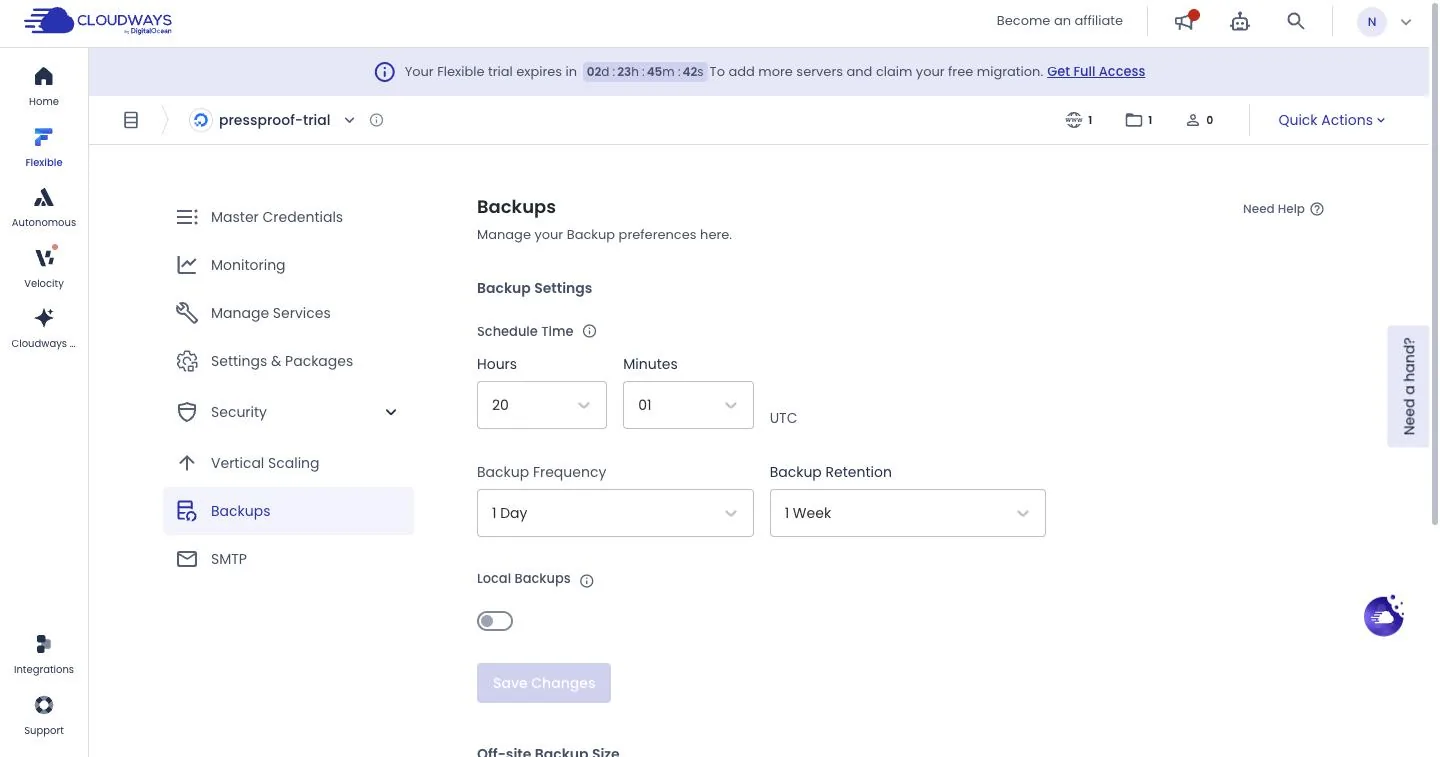 The default backup schedule: once a day, kept for a week.
Staging, in plain English
Staging is where you try changes (a plugin update, a new theme) before they touch the real site. You create the copy from the app's Staging Management screen, then push staging to live or pull live back into staging with one click each, and every push and pull is logged.
Two things I noticed. Building the copy took several minutes, and while it ran, Cloudways locked the app's pages with "There is an operation in progress on this Server," so don't start one right before you need to change something else. And the copy lives on the same server as your live site, so it shares that server's memory. (Putting staging on its own server needs a paid account.)
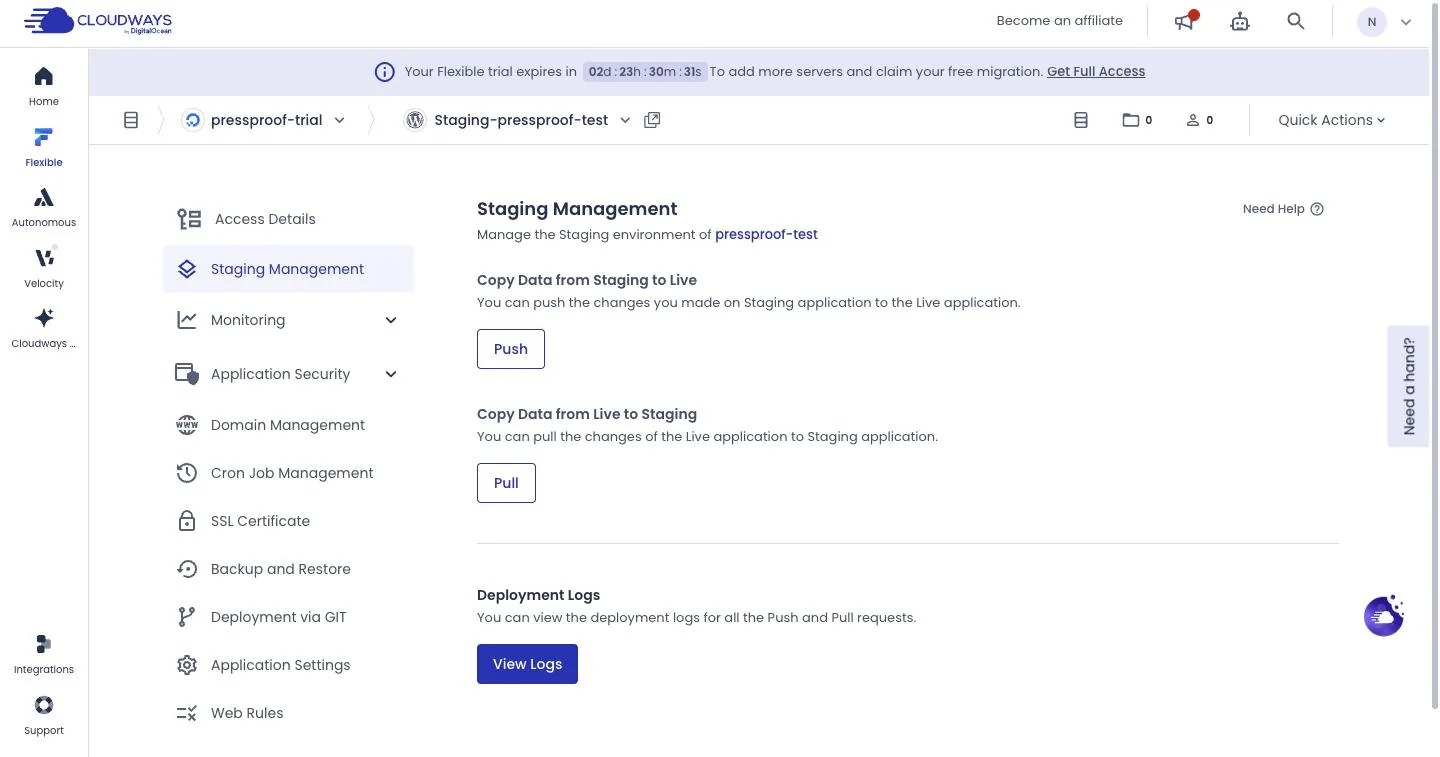 Push copies staging to live. Pull copies live to staging.
Moving a magazine site from Flywheel
One client site I moved to Cloudways is Relevant Magazine (relevantmagazine.com). It used to be on Flywheel, a managed WordPress host that's part of WP Engine. Flywheel sells plans by monthly visits and storage, not by server size. Its pricing page (checked Oct 12, 2026) lists each plan with a visit allowance and charges $1 for every 1,000 visits over it. The page doesn't say what processor or memory sits behind your site.
On Cloudways, Relevant ran on a server with a set amount of processor and memory, and the site ran a lot better for us. I don't have before-and-after numbers to share, so take that as what I saw, not a measurement. My best guess at why: on Cloudways we knew exactly how much processor and memory the site had, and on Flywheel we never did.
The same goes for a small site. Cloudways doesn't bill by visitor, so a traffic spike can slow a small server down, but it won't bring an overage bill for visits. On the DigitalOcean servers in this review, the parts of the bill that grow with use are backup storage and bandwidth past your transfer allowance, both covered in the worked example above.
Things that trip people up
PHP starts on 8.2. Move it up. New apps on my trial server started on PHP 8.2, even though 8.3 and 8.4 are right there in the menu. PHP 8.2 stops getting security fixes on Dec 31, 2026 (per php.net), less than three months after I checked. 8.3 is covered through 2027 and 8.4 through 2028. You change it under Application Settings, then PHP Settings. The dialog recommends an on-demand backup first and warns of a few seconds of downtime; check that your theme and plugins support the newer version.
That dialog also recommends "at least 4 GB." Read the whole note. It starts "You are using multiple apps with different php versions on this server" and says "extra PHP versions use additional memory, which can cause high RAM usage on 1 GB and 2 GB servers." So it's about mixing PHP versions. Move your site and its staging copy up together and the note doesn't describe your server.
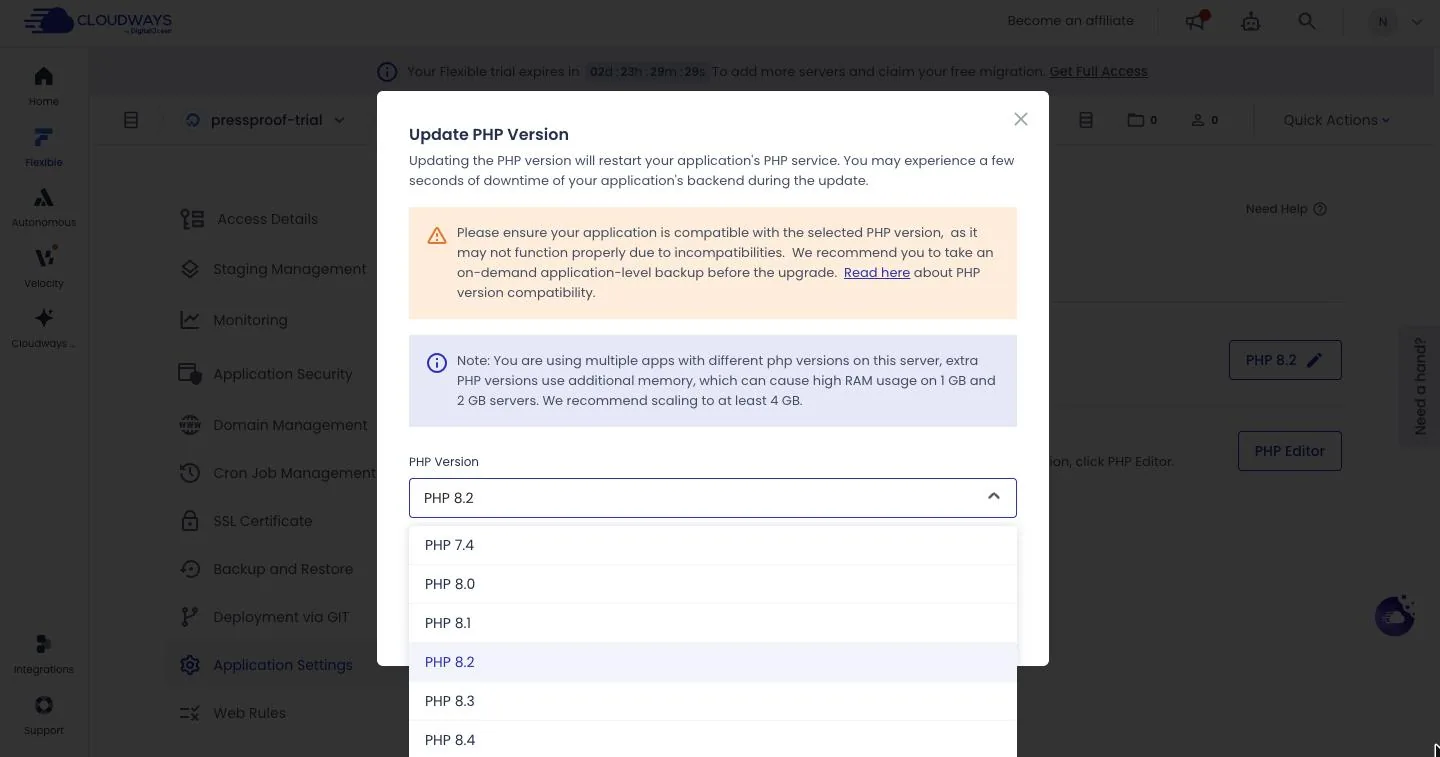 The PHP picker on my trial app: 8.2 by default, with 8.3 and 8.4 available.
Email needs two separate fixes. Cloudways doesn't host mailboxes unless you add them (Rackspace, $1.50 per mailbox a month). Separately, the emails your site sends (contact forms, order receipts, password resets) need SMTP to arrive reliably. SMTP is a proper outgoing mail service your site logs into, and there's an SMTP section in the server menu. Set it up before you launch, then send yourself a test message through your own contact form.
Billing runs as long as a server exists. A forgotten 1GB Premium server is still $14 a month. Delete servers you're not using.
The trial is limited. Three days, no credit card, one server, and billing only starts when you upgrade. AWS, Google, the 8GB-and-up sizes and the General Purpose and CPU Optimized server types stay locked until then. DigitalOcean is open, and it's where I'd put a small site anyway.
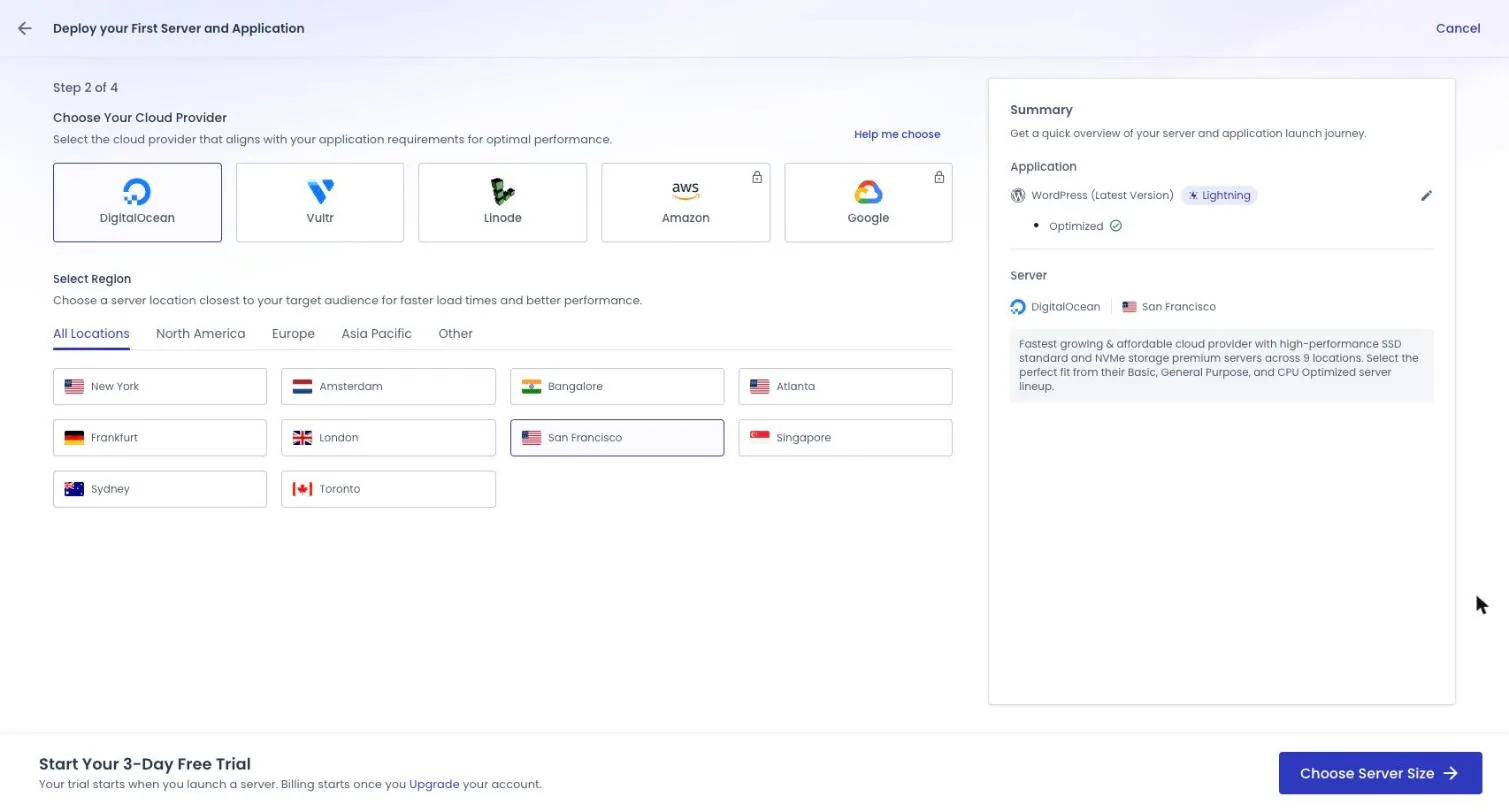 During the trial, Amazon and Google are locked. Pick the region closest to your visitors.
The free migration comes after you upgrade. The pricing page says: "Our expert engineers will migrate your first website to Cloudways for free from any web host." The trial banner says when: "To add more servers and claim your free migration. Get Full Access." Moving an existing site? Upgrade first; that's what unlocks the free migration.
How I'd set it up on day one
- Start the free trial. Choose WordPress and the Lightning stack. Pick Hybrid only if a plugin you rely on needs .htaccess files; you can switch later.
- Pick DigitalOcean and the region closest to most of your visitors.
- Slide the size down to 2GB. Leave it on Premium ($28), or flip to Standard ($24).
- Once it's built, switch PHP to 8.3 or 8.4 (backup first), set up SMTP, and check that daily backups are on.
- Add your domain, then update its DNS (the setting wherever you bought the domain that tells browsers which server your site is on), and install the free SSL certificate.
- Moving an existing site? Upgrade, then claim the free migration.
- Before a launch or a sale, scale up with the disk toggle off. Scale back down after.
Start small. You can scale up whenever your site needs it, so there's no reason to pay for room you might never use.
What changed
- Oct 12, 2026: Rewritten from scratch on a fresh trial server. All prices re-checked that day on Cloudways' pricing page and dashboard.
- Oct 21, 2026: Corrected two example figures against Cloudways' help pages. Backup charges round up to the next 50 cents, so 10 GB of backups is $0.50, not $0.33, and the example month is $31.50 before tax, not $31.33. A full month on DigitalOcean is capped at the listed price, but a resize on or before the 28th puts the whole month on hourly billing, so the launch-weekend resize from 2GB to 4GB adds about $4.79 in a 30-day month and $5.79 in a 31-day month, not $2.79. Also corrected two lines. One overstated the range of client accounts I still get Cloudways bills for. The other said the bill in month one is the bill in year three. There's no renewal price jump, but backup storage and extra bandwidth are billed by use, so the bill can move. Also noted that Cloudways was advertising a 40%-off promo again on Oct 21.